Research a market first.
Open CRM and tap Search investors at the top. Choose Location, then Buying criteria. Save useful profiles to your general investor shortlist.
This action opens a search. It does not select your CRM list.
DISPOSITION / INVESTOR & BUYER RESEARCH
See who has been buying. Research purchase activity by market, historical price and strategy. Save promising investors to a shortlist in your SCOUTRE CRM.
See how it works ↓For wholesalers, flippers and investors researching an exit buyer.
TWO WAYS TO START
Open CRM and tap Search investors at the top. Choose Location, then Buying criteria. Save useful profiles to your general investor shortlist.
This action opens a search. It does not select your CRM list.
Tap Search investors on a CRM property. Available location, property type and price context give you a starting point. Change any criterion and save candidates to that property’s shortlist.
Read the CRM walkthrough →WHO HAS BEEN BUYING?
The investors with the most recorded transactions appear first.
When counts tie, the latest recorded purchase comes next, followed by stable name and identity ordering. Price narrows the search; it does not decide the primary rank.
Review transaction count alongside the observation period and markets in the profile. A high total can cover several years and locations.
30 profiles per page. Continue through all remaining matches.
SEE HOW IT WORKS
Explore the mobile workflow. These previews use sample data; changing a step does not run an investor search.
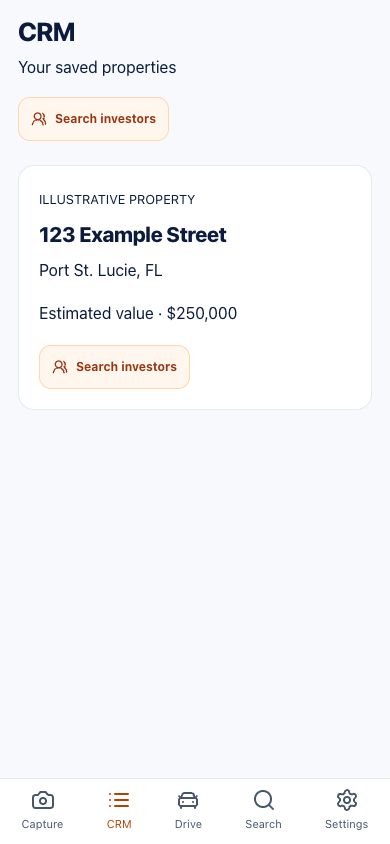
01 / THE WORKFLOW
Tap Search investors at the top for a market search, or on one saved property for a property-specific search.
Open screen at full size ↗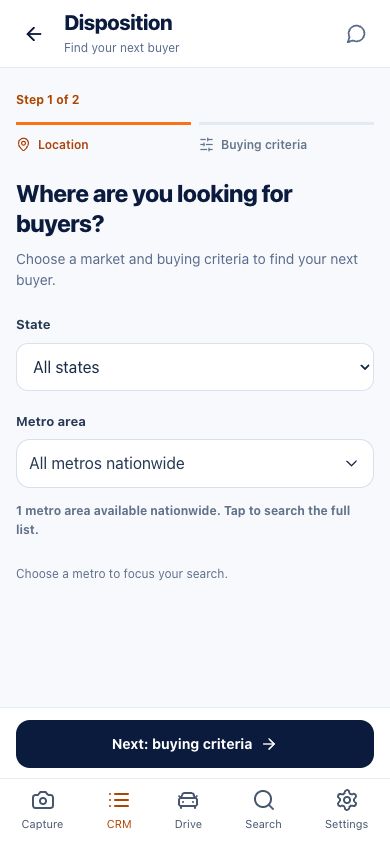
02 / THE WORKFLOW
Independent searches start with Location. Choose a supported state and metro. A metro can include surrounding communities.
Open screen at full size ↗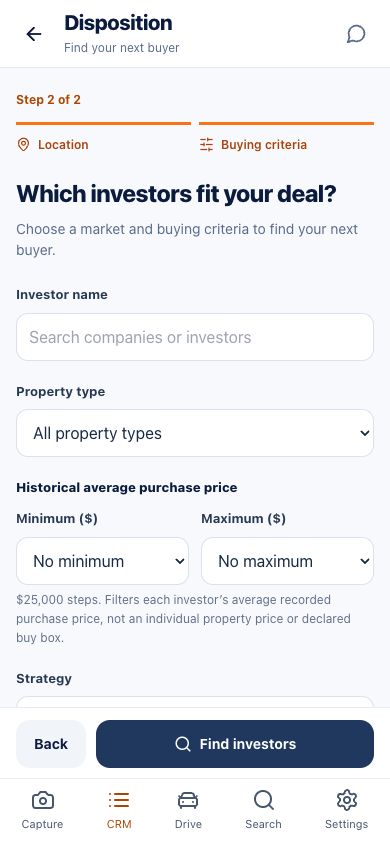
03 / THE WORKFLOW
Narrow historical average purchase price, property type and strategy. Review the available activity filters.
Open screen at full size ↗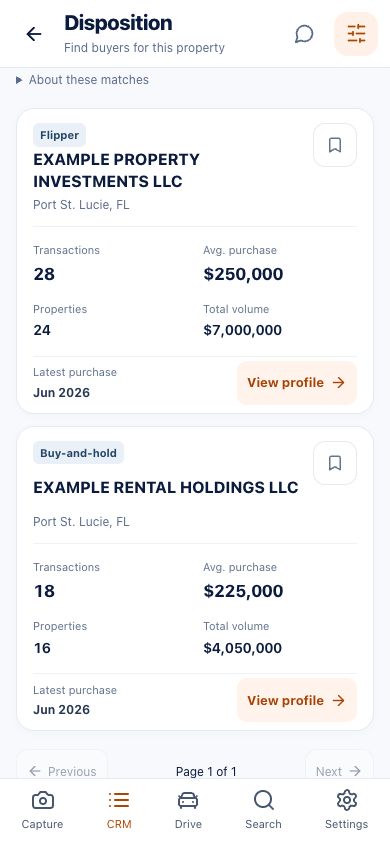
04 / THE WORKFLOW
Transactions appear first. Results sort by recorded transaction count, then latest purchase when counts tie.
Open screen at full size ↗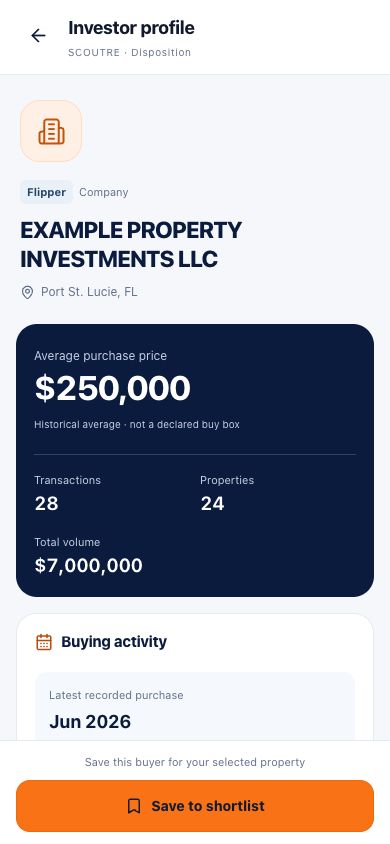
05 / THE WORKFLOW
Review dates, markets, property types, cash-purchase history and available lender observations before choosing a candidate.
Open screen at full size ↗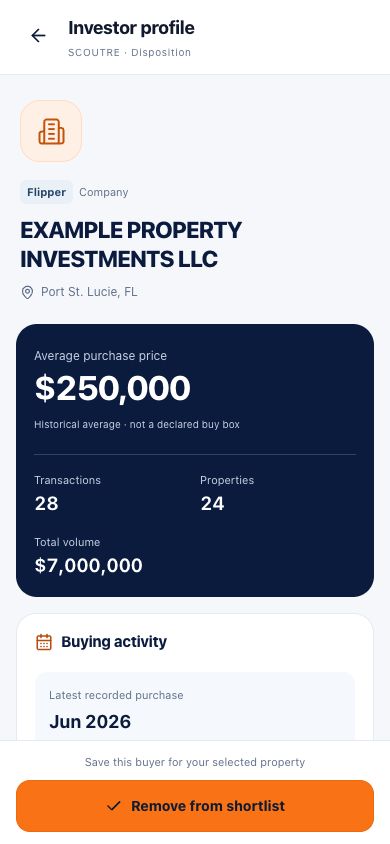
06 / THE WORKFLOW
Keep a general shortlist or save a profile to the selected property’s shortlist. Saving does not send a message.
Open screen at full size ↗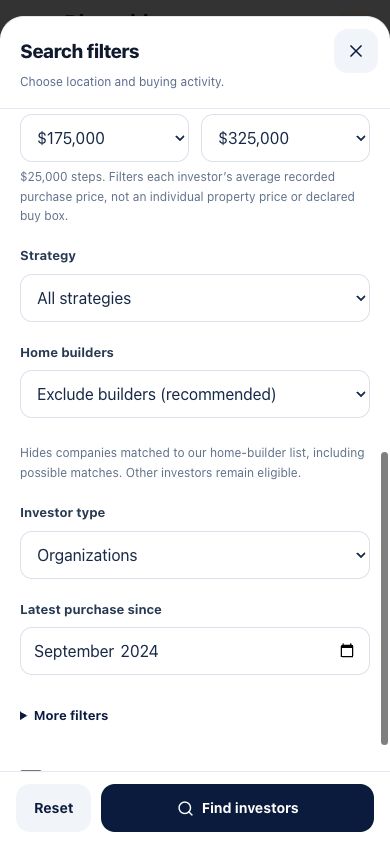
07 / THE WORKFLOW
Exclude builders, include them, search matched builders only, or review possible affiliations separately.
Open screen at full size ↗NARROW THE SEARCH
Select a supported state or metro and recorded property type. Metros can include surrounding communities.
Compare historical average purchase prices with your selected range. Add a strategy such as Flipper or Buy-and-hold.
Use latest purchase, transaction totals, cash-purchase percentage and builder controls to refine the research.
| Filter | What it does |
|---|---|
| Investor name | Search a company or investor by name. |
| State and metro | Choose a supported state, search across states, or select a supported metro. Metros include surrounding communities. |
| Property type | Use the recorded property categories available in the selector. |
| Minimum / maximum average purchase price | Set either bound in $25,000 steps, or choose no minimum / no maximum. This filters historical averages, not declared budgets. |
| Investor strategy | Choose an available classification based on recorded activity. |
| Home builders | Exclude builders by default; include builders; show matched builders only; or show possible builders only. |
| Investor type | Organizations, individuals, or both. |
| Latest purchase since | Filter by the latest recorded purchase month. It does not change the period used for transaction totals. |
| Minimum transactions | Set a minimum recorded transaction total. |
| Minimum properties | Set a minimum recorded property count. This is not a current portfolio size. |
| Minimum purchase volume | Set a minimum recorded dollar volume. |
| Minimum cash purchases | Set a minimum recorded cash-purchase percentage. It does not prove current funds. |
| Shortlist only | Show saved profiles in the current general or property-specific shortlist. |
READ THE PROFILE
Look beyond a company name.
Review transactions, property count, total purchase volume, historical average price and the latest recorded purchase month. First and last observed months put those totals in context.
Available property types, buying indicators, states, metros and market-level observations help you compare candidates. Financing details can show recorded cash-purchase percentage and observed lender names.
Builder classifications, collection dates and missing-data explanations stay visible. An unavailable value is not zero.
DIFFERENT BUYERS, DIFFERENT QUESTIONS
Review the recorded purchase pattern, then ask about condition, renovation scope and resale plans.
Research rental-investor candidates, then confirm the property types and rental economics they want.
Compare available market observations and confirm the organization’s current acquisition process.
Review the available classification and identity details. Confirm which entity would be involved in your deal.
This label means limited purchase history in the available records. It does not mean the investor is new to investing.
Builders are a valid search category. Include them, isolate matched builders, or review possible affiliations separately.
Classifications describe observed activity, not an investor’s declared current acquisition criteria. Default searches exclude matched and possible builders.
KEEP RESEARCH CONNECTED
Research a market before choosing a property. Save candidate profiles from your independent search and return to them in that context.
Start from a saved property and keep candidate profiles tied to that deal. Shortlist only shows saves for the current context.
Find properties with Property Discovery Foreclosures & Auctions, keep them in CRM, then research potential buyers with Disposition.
Owner lookup and property-owner skip tracing serve a different job. They do not automatically enrich investor profiles with contact details.
WORKED EXAMPLE / PORT ST. LUCIE, FLORIDA
Illustrative workflow, not a live search or a customer result.
Review the metro label; surrounding communities can be included.
For an intended $250,000 sale price, the suggested ±30% range is $175,000–$325,000. Suggested bounds round outward to $25,000 steps. Change them to suit your research.
Select Flipper for this example. Keep builders excluded, or choose a builder-specific search if that is your intended buyer.
Results sort by recorded transaction count. Read the observation period and latest purchase before deciding which profile to open.
Check price history, property types, markets and financing indicators. Save to the general shortlist or the selected property’s shortlist.
Find and verify the right contact, ask what they are buying now, and verify purchasing capacity before relying on them for a deal.
From a property, listing price supplies the starting price when available; otherwise an estimated value may be used. Missing required location or price details prompt completion. All criteria can be changed.
PRACTICAL ANSWERS
Disposition is the selling side of a real estate investment. In wholesaling, it includes finding an end buyer for a deal or contract interest. SCOUTRE Disposition helps with investor research and shortlisting; it does not complete the sale or assignment.
Choose a supported state or metro, then review recorded purchase activity. Use the minimum cash-purchase percentage filter when cash history matters. Compare profiles and independently confirm current buying interest, criteria and purchasing capacity.
Yes. Tap Search investors on that property. Available property context preselects its mapped metro, property type and suggested historical average-price range. Listing price takes precedence over estimated value. You can enter your intended sale price and change every criterion. Missing required location or price details must be completed before searching.
Yes. Tap Search investors at the top of CRM. Complete Location, then Buying criteria. This opens an independent search and does not select your CRM list. Profiles you save go to your general investor shortlist.
Investor name, state, metro, property type, minimum and maximum historical average purchase price, investor strategy, home builders, investor type, latest purchase since, minimum transactions, minimum properties, minimum purchase volume, minimum cash-purchase percentage and shortlist only.
Recorded transaction count comes first, highest to lowest. Equal counts are ordered by latest recorded purchase, then stable name and identity tie-breakers. Price is a filter, not the primary ranking. There are 30 profiles per page, with pagination to remaining matches.
It counts recorded transactions across the profile’s observed period, which can span multiple markets. Latest purchase since filters on the latest recorded purchase month; it does not recalculate transaction totals within that date range. Property count does not establish current ownership.
No. It is the historical average price in the available purchase records. Use it to narrow research, then ask the investor about their current acquisition criteria. A matching average does not mean they want your property.
Yes. Available strategy labels include Flipper, Buy-and-hold, Institutional, Multi-entity and Recently active buyer. Labels describe observed activity. Recently active buyer means limited purchase history in the available records, not that the investor is new to investing.
Yes. Default searches exclude matched builders and possible builder matches. You can include builders, show matched builders only, or review possible builders only. A possible affiliation needs review; builders are a valid research category.
No. Disposition does not currently include investor phone numbers or email addresses. Saving a profile does not send a message. Property-owner research and outreach elsewhere in SCOUTRE are separate features, not investor-contact enrichment.
No. Results are research candidates based on recorded activity. Independently confirm who represents the investor, whether they are buying now, their current criteria and their ability to close. Historical cash activity is not current proof of funds.
Search supported states and metro areas shown in the current selector. A metro can include several cities and surrounding communities. Coverage varies by available investor research data. Dedicated city, county, ZIP-code, radius and neighborhood filters are not part of this workflow.
Independent searches save to a general investor shortlist. Searches opened from a CRM property save to that property’s shortlist. Shortlist only shows saved profiles in the current context. Shortlisting organizes research; it does not contact or automatically match buyers.
YOUR NEXT STEP
Use recorded purchase activity to focus your buyer research. Read the profile, keep a shortlist, then confirm the fit.
SCOUTRE on the App Store ↗ · Check current feature access with support.