Choose the properties worth researching before you spend. Filter by location, ownership, distress and equity; then get each selected property record with available mortgage and equity information plus available owner phone numbers and emails.
Live data requested for your order—not a recycled list.Targeted property research.
Example: search Florida pre-foreclosures with at least 40% estimated equity whose owners receive mail out of state. See the match count free, refine it, then pay only for the new records you choose.
Your criteria. Your property research. Property details + available phone and email lookup
SCOUTRE requests Discovery results from a live dataset after purchase and records retrieval time. Most fields update daily, MLS updates intraday, and ownership changes typically appear within days to weeks after counties publish recorded deeds. Results are not exclusive, and contact matches are not guaranteed.
Filter before you buy.Property + available contacts included.Research the properties that fit.
BEFORE YOU BUY ANOTHER LIST
Pay for fit. Not list size.
A downloaded list can be new to you and still be months old—or already worked by other investors. Discovery lets you define the opportunity first, preview the count free and purchase only the new research records you select.
Choose market, ownership, distress and equity criteria before buying research.
Each researched result bundles the selected property record, available mortgage and equity information, and skip tracing for available owner phones and emails. One record, ready for CRM.
01
Your criteria come first
Choose market and signals. See match count before spending.
02
New research requested
After purchase, SCOUTRE requests each new record from a live dataset and records retrieval time.
03
Contacts travel with the property
Available owner phones and emails stay with property research in your CRM.
Underlying records still follow source update cycles. Coverage, field availability and contact hit rates vary. Discovery does not promise an untouched lead or seller response. How data timing works →
ONE CONNECTED WORKFLOW
Three ways to start. One place to work.
01 / IN THE FIELD
At the property
Use Capture or Drive to research a property on your route.
Choose the search. See the count. Review your total. Keep the records you research.
STEP 01
Choose your search
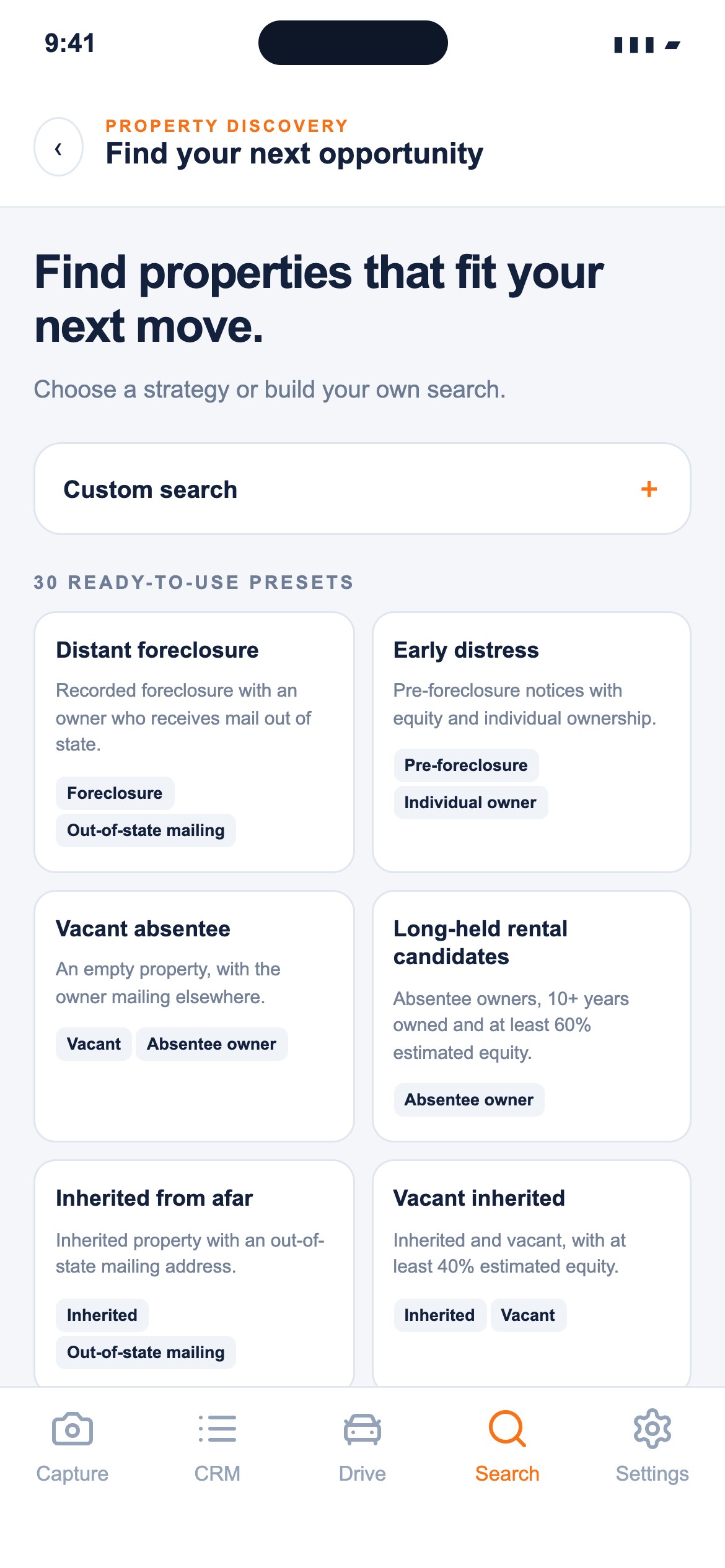
Start with a preset for your investment strategy, or build a custom property search. Review the filters before choosing your area.
STEP 02
Choose where
Search statewide. In Florida, choose one county or up to 20 cities.
STEP 03
Combine signals
Choose All to require every signal, or Any to match at least one. Area and numeric limits still apply.
STEP 04
Set your limits
Refine equity, value, property attributes and supported dates. Keep the recording window visible.
STEP 05
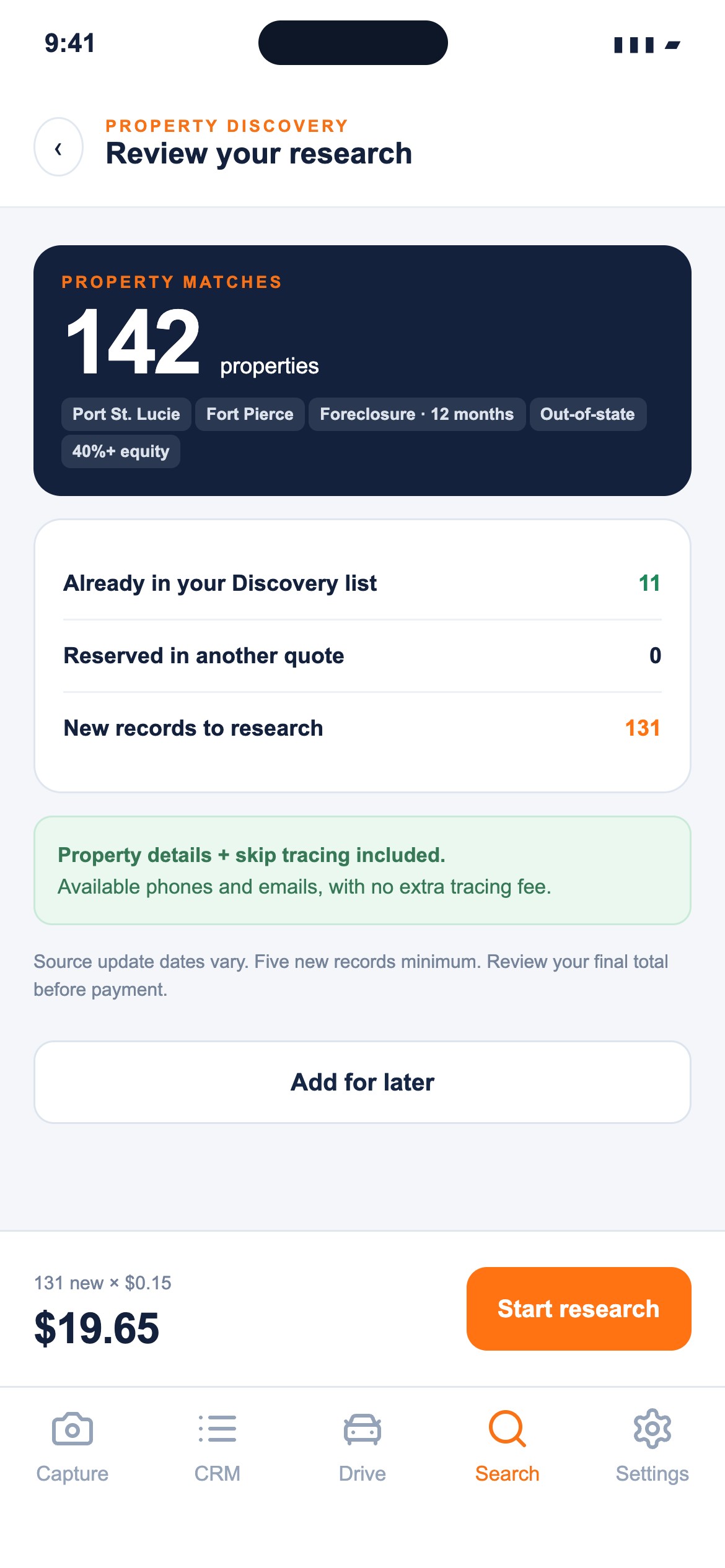
Count before you pay
Review total matches, already-owned records and new records. Here, 142 minus 11 gives 131 new records to research.
STEP 06
Keep small searches
Save smaller searches for later. Combine unique matches in your research queue. Overlaps count once.
STEP 07
Open your research
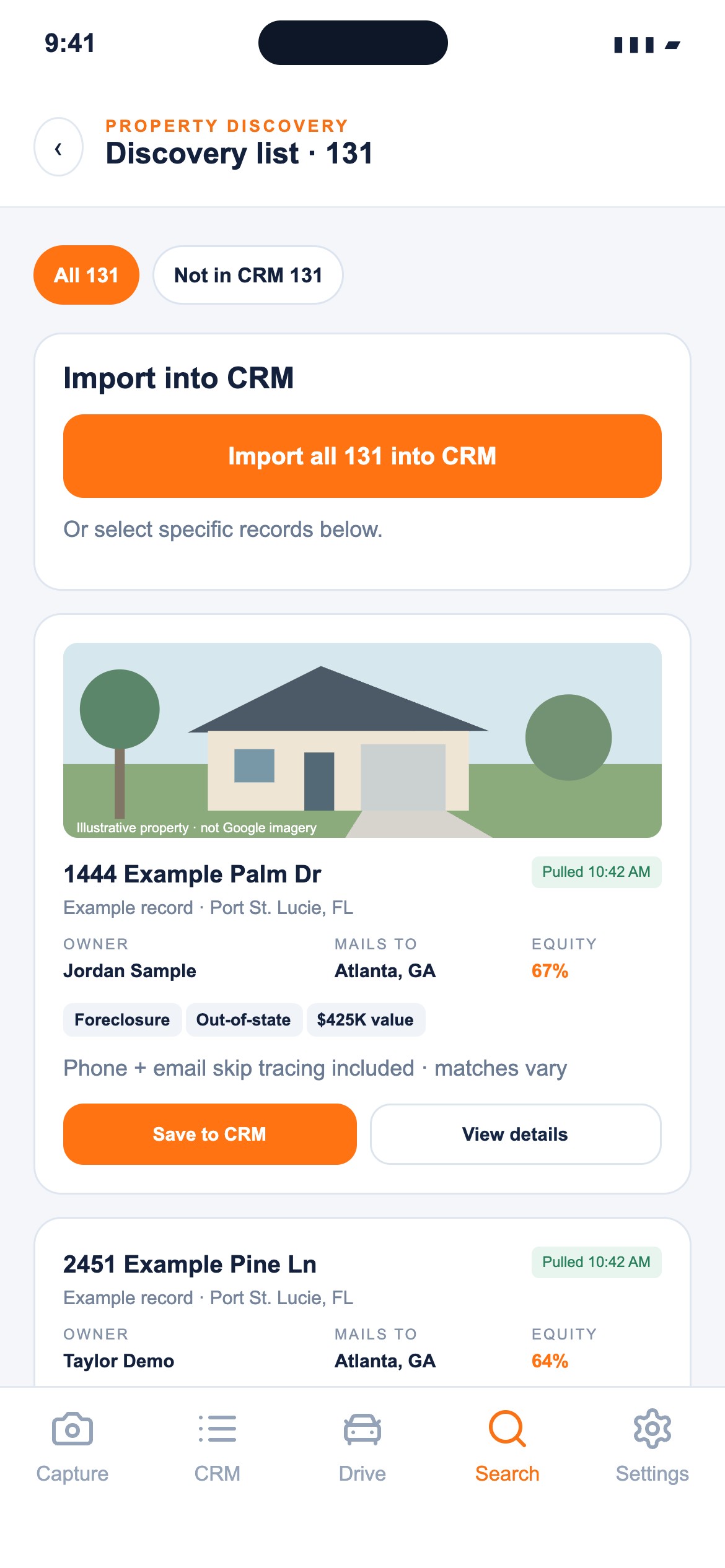
After payment and delivery, review available property and owner details, mortgage information and imagery.
STEP 08
Import into CRM
Import one, selected or all records. Find imported research again with the Property Discovery source filter.
STEP 09
Return to your list
Reopen delivered records from your library. Running a search again can return a different count.
30 READY-TO-USE PRESETS
A strategy, not a blank form.
Review the search criteria for each preset below. Choose one that fits your strategy, then adjust the filters. Geography is chosen separately; a signal is a starting point for research.
Showing all 30 presets
DistressDistant foreclosure+
Foreclosure
Out-of-state mailing
Estimated equity ≥ 40%
Recording window: past 12 months
Match all · Choose your area next
DistressEarly distress+
Pre-foreclosure
Individual owner
Estimated equity ≥ 40%
Recording window: past 12 months
Match all · Choose your area next
PropertyVacant absentee+
Vacant
Absentee owner
Estimated equity ≥ 50%
Match all · Choose your area next
OwnershipLong-held rental candidates+
Absentee owner
Estimated equity ≥ 60%
Years owned at least: 10
Match all · Choose your area next
OwnershipInherited from afar+
Inherited
Out-of-state mailing
Estimated equity ≥ 40%
Match all · Choose your area next
OwnershipVacant inherited+
Inherited
Vacant
Estimated equity ≥ 40%
Match all · Choose your area next
DistressAuction equity+
Auction
Estimated equity ≥ 30%
Recording window: past 12 months
Match all · Choose your area next
ListingsStale listings+
Active listing
Estimated equity ≥ 40%
Days on market at least: 120
Match all · Choose your area next
ListingsCancelled listings+
Cancelled listing
Estimated equity ≥ 40%
Match all · Choose your area next
ListingsPrice-reduced listings+
Active listing
Price reduced
Estimated equity ≥ 40%
Match all · Choose your area next
Equity & debtDebt-free distant owners+
Free and clear
Out-of-state mailing
Match all · Choose your area next
Equity & debtDebt-free vacant+
Free and clear
Vacant
Match all · Choose your area next
PropertyOlder absentee homes+
Absentee owner
Estimated equity ≥ 50%
Year built at or before: 1980
Years owned at least: 10
Match all · Choose your area next
OwnershipLong-held company homes+
Company owner
Absentee owner
Estimated equity ≥ 50%
Years owned at least: 10
Match all · Choose your area next
DistressPrivate-loan distress+
Private lender
Pre-foreclosure
Estimated equity ≥ 30%
Recording window: past 12 months
Match all · Choose your area next
OwnershipVacant trust-owned+
Trust owner
Vacant
Estimated equity ≥ 40%
Match all · Choose your area next
DistressAuction watch+
Auction
Recording window: past 12 months
Match all · Choose your area next
DistressLender inventory+
Bank owned
Match all · Choose your area next
Equity & debtCash-backed ownership+
Cash buyer
Match all · Choose your area next
Equity & debtMortgage-free+
Free and clear
Match all · Choose your area next
Equity & debtEquity cushion+
Estimated equity ≥ 40%
Match all · Choose your area next
ListingsMarket live+
Active listing
Match all · Choose your area next
DistressBefore foreclosure+
Pre-foreclosure
Recording window: past 12 months
Match all · Choose your area next
OwnershipEstate watch+
Deceased owner (not confirmed probate)
Match all · Choose your area next
PropertyUnoccupied homes+
Vacant
Match all · Choose your area next
PropertyOpen ground+
Land-classified parcels
Match all · Choose your area next
DistressVacant distress+
Vacant
Pre-foreclosure
Recording window: past 12 months
Match all · Choose your area next
PropertyShort-hold resales+
Prior owner was individual
Prior owner held for 12 months or less
Match all · Choose your area next
DistressTax arrears watch+
Tax delinquency year recorded: 1990 or later
Match all · Choose your area next
OwnershipSenior exemption+
Senior citizen tax exemption (provider code F)
Match all · Choose your area next
Court restructuring, Ownership separation, Recorded encumbrances and Negative equity are not available searches. Current data access does not support their complete criteria. No single-family default applies to every preset.
BUILD YOUR OWN SEARCH
Choose where. Decide why. Set your limits.
Where
Statewide searches across all 50 states. Florida adds county selection and up to 20 cities per search.
Signals
Match All selected signals or Any one. Combine vacancy, ownership, foreclosure, mortgage and listing signals.
Limits
Refine estimated equity, value, property attributes and supported dates. Area and numeric limits apply in both matching modes.
Property 29 controls
Attic
Basement
Carport
Garage
HOA association
Pool
Multifamily 2–4 units
Multifamily 5+ units
Deck
Patio
Breezeway
RV parking
Balcony
Fire sprinklers
Air conditioning available
Flood zone
Baths · min / max
Beds · min / max
Building size (sq ft) · min / max
Deck area (sq ft) · min / max
Lot size (sq ft) · min / max
Rooms · min / max
Pool area (sq ft) · min / max
Stories · min / max
Units · min / max
Year built · min / max
Last update date · min / max
Property use · select options
Assessor building condition · select options
Owner 10 controls
Absentee owner
Out-of-state mailing
In-state absentee owner
Individual owner
Company owner
Trust owner
Inherited
Deceased owner (not confirmed probate)
Vacant
Prior owner was individual
Distress 11 controls
Foreclosure
Pre-foreclosure
Auction
Bank owned
Judgment
Auction date · min / max
Foreclosure date · min / max
Pre foreclosure date · min / max
Last opening bid amount · min / max
Last judgment amount · min / max
Foreclosure notice type · select options
Debt 6 controls
Free and clear
Cash buyer
Investor buyer
Private lender
Adjustable rate
Assumable
Listing 8 controls
Active listing
Pending listing
Cancelled listing
Sold listing
Price reduced
MLS days on market · min / max
MLS listing price · min / max
Listing price to value percent · min / max
Transfers 2 controls
Last sale at arm’s length
Quitclaim transfer
Value & equity 8 controls
Assessed improvement value · min / max
Assessed land value · min / max
Assessed value · min / max
Estimated equity · min / max
Ltv · min / max
Median income · min / max
Value · min / max
Improvement value percent · min / max
Owner & transfers 18 controls
Last sale date · min / max
Last sale price · min / max
Latest arms length sale date · min / max
Latest non arms length sale date · min / max
Latest arms length sale amount · min / max
Portfolio equity · min / max
Portfolio purchased last12 · min / max
Portfolio purchased last6 · min / max
Portfolio value · min / max
Prior owner months owned · min / max
Prior arms length sale date · min / max
Prior non arms length sale date · min / max
Prior arms length sale amount · min / max
Properties owned · min / max
Tax delinquent year · min / max
Years owned · min / max
Tax exemption · select options
Recorded document type · select options
Mortgage 14 controls
Mortgage · min / max
Portfolio mortgage balance · min / max
Open mortgages · min / max
First mortgage recording date · min / max
Second mortgage recording date · min / max
Third mortgage recording date · min / max
First mortgage percent · min / max
Second mortgage percent · min / max
Third mortgage percent · min / max
Open mortgage percent · min / max
Estimated mortgage payment · min / max
First mortgage loan type · select options
Second mortgage loan type · select options
Third mortgage loan type · select options
Field availability varies by property, county and source. Recording signals may be historical. Deceased or inherited flags do not confirm probate or authority to sell. Street-level filters, complete court and lien records, and every MLS status are not included.
KNOWN ADDRESS
Included within plan limits
Search one known address and review available property and mortgage information. Run one-by-one skip tracing for available phones and emails. No separate charge per included lookup.
PROPERTY DISCOVERY
$0.15 per new researched record
Choose filters and preview match count free. Every purchased result bundles property details, available mortgage and equity information, plus available owner phones and emails.
PROPERTY DATA + CONTACT LOOKUP
$0.15 per new researched record.
Qualify with filters first. Pay for selected research second. Property information and available contact lookup arrive together.
SCOUTRE requests each Discovery order from a live dataset—not a recycled list. Five-record minimum; already-owned Discovery records are excluded from new charges.
100 new records cost $15.00. 200 cost $30.00. Final available quantity and total appear before payment. Coverage and field availability vary; contact matches and seller responses are not guaranteed. Physical mail is priced separately.
Five new records minimum. Up to 1,000 matches per order.
Price illustration only. This calculator runs on your device; it does not query property data, consume API credits or create a purchase.
A SMALL SEARCH IS STILL A START
Save three. Find two more.
Add small searches for later. Your research queue combines unique new records until you reach five.
Two searches with three matches each and one overlapping property give you five unique records. Overlapping matches count once. Queued searches stay on your current device.
3+3− 1 overlap =5
PAID LIBRARY → CRM
Keep the research. Work the opportunity.
After payment and delivery, review property details, available skip-traced phones and emails, mailing information, value, equity and Google Street View where available. Imagery is not guaranteed and is not a complete MLS photo gallery.
Import one, selected or all purchased records into CRM.
Filter CRM by Property Discovery to find your research.
Keep property context with notes, follow-ups and next steps.
Bring a property into CRM, then open Search investors from that record. Available location, property type and price supply editable starting criteria. Keep candidates on that property’s shortlist.
Property Discovery finds property matches from a strategy and filters. Start with a preset or a custom search, choose an area, refine signals and limits, then preview the match count before purchasing new records.
What does Property Discovery research include?
Researched results bring property details and available owner phones and emails together. Review matching properties and import the records you want to work into CRM.
Can I see the number of matches before paying?
Yes. Match counts appear before payment. Property details unlock after payment and delivery. Counts can change when refreshed.
What does “new record” mean?
It means a matching record you do not already own in your Discovery library. Existing Discovery purchases are excluded from new charges. A property merely being present elsewhere in CRM does not necessarily mean it was purchased through Discovery.
Can I combine smaller searches?
Add the search for later and keep researching. Your queue combines unique new matches across searches. Overlapping records count once. The queue is saved on your current device.
Can I search anywhere in the United States?
Discovery supports statewide searches across all 50 states. Florida also supports county selection and up to 20 cities in a search. Nationwide address lookup remains available as a separate workflow. Coverage and field availability vary.
How many presets are available?
There are 30 supported presets. Four additional catalog concepts depend on data capabilities that are not currently connected; they should not be treated as available searches.
What is the difference between All and Any?
All requires every selected signal. Any requires at least one selected signal. Your chosen geography and numeric limits continue to apply in both cases.
Are Discovery results pulled from a recycled list?
No. After purchase, SCOUTRE requests results from a live dataset and records retrieval time. Most fields update daily as county, recorder and vendor feeds arrive. MLS updates intraday. Ownership changes typically appear within days to weeks after counties publish recorded deeds. Purchased research stays in your library.
Does SCOUTRE store my research?
Yes. Purchased records stay in your Discovery library so you can reopen and import them without repurchasing them. Match estimates can use a short-lived cache. After purchase, SCOUTRE requests results from a live dataset and records retrieval time. Most fields update daily, MLS updates intraday, and ownership timing depends on county deed publication.
Are these exclusive leads?
No. Property and public-record data may be available to other researchers. SCOUTRE helps you choose the criteria and move the research into your own workflow; it does not promise exclusive owners or properties.
Does a foreclosure or inherited signal mean the owner will sell?
No. Signals describe available record information. A filing may be historical, and an inherited or deceased-owner flag does not confirm probate, authority to sell or willingness to sell. Review dates and verify material facts before acting.
Are photos included?
Paid records can display Google Street View imagery where available. Not every property has imagery, and this is not a promise of a complete MLS photo gallery or interior photographs.
Can I import results into CRM or export them to CSV?
Yes. Import an individual record, selected records or a batch from your paid Discovery library into SCOUTRE CRM, or export your researched records to CSV.
Does Property Discovery include skip tracing?
Yes. Each paid Property Discovery result includes property details plus skip tracing for available owner phone numbers and email addresses, with no separate skip-tracing fee for that result. Contact matches are not guaranteed. Your subscription also includes one-by-one skip tracing within plan limits for properties researched individually. Physical mail is priced separately.
Can I pull every property in a state?
Discovery currently supports up to 1,000 matches per order. If the query is larger, narrow its geography or criteria. It is not an unlimited state-data export tool.
YOUR NEXT MOVE STARTS WITH NEW RESEARCH
Make your next move. Find properties that fit.
Count matches free. Research the matching records you choose. Property details and contact lookup included.